

One frustration I have encountered with Autotask PSA is how customer replies can unnecessarily reopen completed tickets.
An engineer might complete a straightforward request, such as a security group change, user offboarding or first-line support issue. The customer receives the resolution email and replies:
Thanks!
Autotask can treat this response as a reason to reopen the ticket, even though no further work is required. An engineer then has to review and close it again.
These unnecessary reopens create additional work, can confuse customers and may make ticket reopen statistics less accurate.
I wanted a more intelligent way to determine whether a customer response actually required further action.
Adding AI to the Process
Using Rewst, Autotask PSA and an AI model through Microsoft Foundry, I created a workflow that reviews customer responses before deciding what should happen to the ticket.
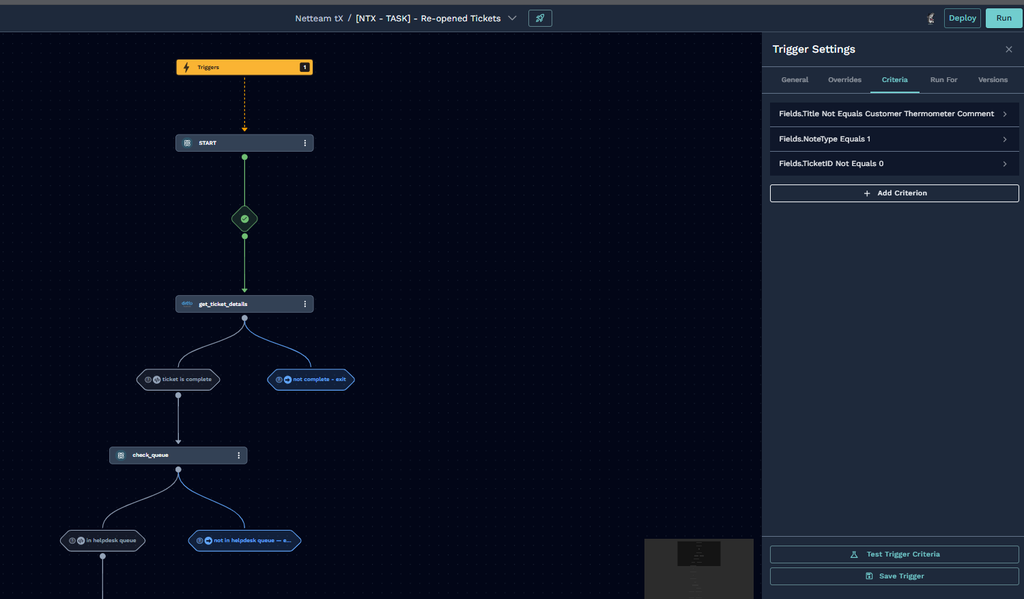
The workflow runs when a public note is added to an Autotask ticket. It then checks:
- Is the ticket currently completed?
- Does the ticket belong to one of the designated helpdesk queues?
- Has the note come from a customer rather than an Autotask resource?
If the ticket does not meet these conditions, the workflow stops without making any changes.
This prevents the automation from interfering with active tickets or tickets belonging to project, billing or other non-helpdesk queues.
Reviewing the Customer’s Response
Once the initial checks have passed, the workflow retrieves the ticket, company and latest public note from Autotask.
The customer’s message is then submitted to the AI model for review.
The AI is instructed to determine whether the response indicates that:
- The issue is unresolved
- The problem has returned
- The customer needs further assistance
- No further action is required
For example, a message such as:
Thanks, that’s working now.
should not reopen the ticket.
However, a message such as:
I’ve tried again, but I’m still receiving the same error.
clearly requires further investigation.
The AI Prompt
The following prompt instructs the AI to return a simple, structured decision that the Rewst workflow can process:
You are an IT support assistant that extracts structured information from helpdesk ticket descriptions and provides actionable guidance for support engineers.

You need to review the latest message from the client and determine if the ticket needs to be re-opened or should remain closed.

The client response:
{{ CTX.lastest_note }}

---

Respond ONLY with a valid JSON object in the following format. Do not include any explanation, markdown, or text outside of the JSON block:

```json
{
  "reopen": true,
  "reasoning": "A clear explanation of why the ticket should be reopened or remain closed based on the client's message."
}
```

Rules:
- Set `reopen` to `true` if the client's message indicates the issue is unresolved, has returned, or requires further action.
- Set `reopen` to `false` if the client's message is a thank you, confirmation of resolution, or does not indicate any ongoing issue.
- The `reasoning` field must be a concise but complete explanation referencing specific details from the client's message.
- Some notes may be automated messages generated by systems such as "Rocketship" or "Workflow" rules. Ignore these entirely when making your decision — they are not genuine client responses and should not influence whether the ticket is reopened.
- Only base your decision on notes that appear to be written by a real person (a client or end user).
- Try to use the names of people and companies involved, if available in the data presented.
- If the ticket has been responded to as part of a problem or over-acting ticket, leave the ticket in its current state and make no changes.
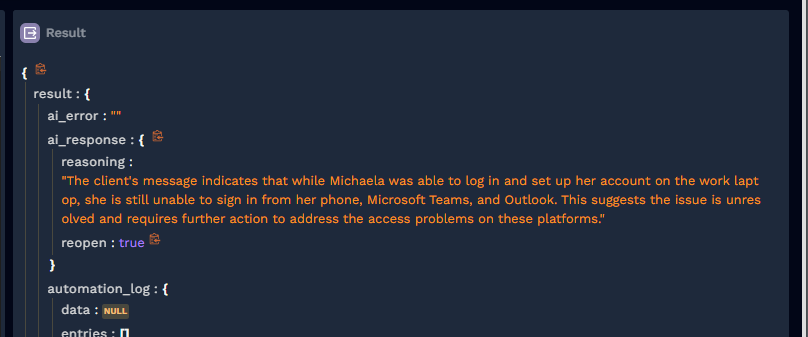
The AI returns a JSON response containing the decision and its reasoning:
{
  "reopen": true,
  "reasoning": "The customer reports that the original problem is still occurring and requires further investigation."
}
Using a structured JSON response makes it easier for the workflow to process the decision reliably.
Deciding What Happens to the Ticket
If the AI decides that no further action is required, the ticket remains completed.
This means that thank-you messages, confirmations and other replies that do not require support will not create more work for the helpdesk.
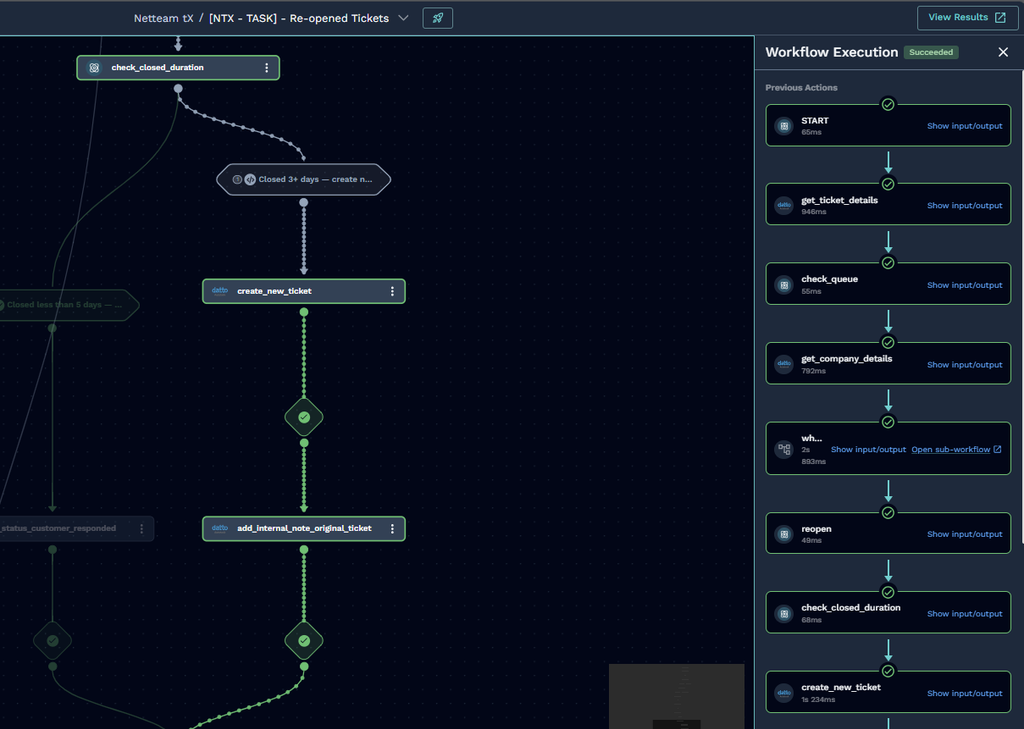
If the AI decides that further action is required, the workflow checks how long the ticket has been closed.
Tickets Closed for Less Than Five Days
If the ticket was completed less than five days ago, the original ticket is reopened.
Its status is changed to Customer Responded, allowing the engineer to continue working from the existing ticket and retain the full conversation history.
Tickets Closed for Five Days or More
If the ticket has been completed for five days or longer, the workflow creates a new ticket instead.
Reopening an older ticket can affect historical SLA figures and reporting. Creating a new ticket allows the new request to be tracked separately while preserving the context of the original issue.
The new ticket carries across relevant information, including:
- Company
- Original ticket title
- Issue type
- Source
- Priority
- Original ticket number
- Customer’s latest message
An internal note is also added to the new ticket with details of the original request and a direct link back to it in Autotask.
This gives the engineer the context they need without having to search for the previous ticket manually.
Keeping Reporting Accurate
When a ticket genuinely requires further work, the workflow updates two Autotask user-defined fields through the API:
- Ticket Reopened: YES
- FCR Achieved: No
The first field makes genuine ticket reopens easier to identify in reports.
The second records that first-contact resolution was not maintained because the customer required additional support.
These fields help ensure that ticket reopen and first-contact-resolution reporting reflects what actually happened.
Notifying the Engineering Team & Management
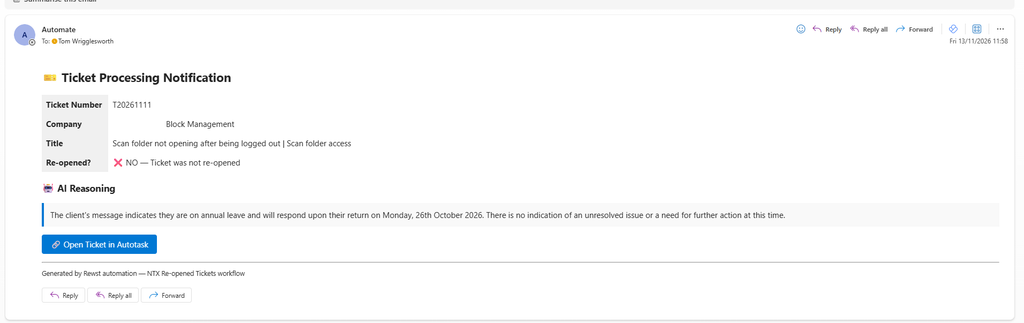
At the end of the workflow, a notification is sent to the helpdesk management and the primari assigned engineer.
The notification includes:
- Ticket number
- Company
- Ticket title
- AI decision
- AI reasoning
- Action taken by the workflow
- Direct link to the ticket in Autotask
This keeps the team informed without requiring an engineer to manually review every response to a completed ticket.
Rewst Is Not a Requirement
Although I built this workflow using Rewst, the underlying process is not dependent on it.
At a high level, the automation follows these steps:
- Detect a new customer response.
- Check that the ticket is completed.
- Confirm that it belongs to a helpdesk queue.
- Retrieve the latest response through the Autotask API.
- Ask an AI model to review the message.
- Keep the ticket closed if no action is required.
- Reopen a recently completed ticket if more work is needed.
- Create a new ticket if the original has been closed for five days or longer.
- Update the reporting fields.
- Notify the engineering team.
The same approach could be implemented using another automation platform, an Azure Function, PowerShell, Python or any other service capable of working with the Autotask and AI APIs.
The Result
The main benefit is not simply using AI to reopen tickets. It is using AI to stop tickets from being reopened when they do not need to be.
A response such as:
Thanks, that’s sorted.
can safely leave the ticket completed.
A response such as:
I’m still having the same problem.
If further help is requested on an older ticket, the workflow can create a new request while retaining the relevant context from the original.
The result is:
- Less manual triage for engineers
- Fewer unnecessary ticket reopens
- More accurate SLA reporting
- More accurate first-contact-resolution reporting
- A consistent process for handling customer responses
- Clear visibility into the AI’s decisions
The workflow can also be refined over time by updating the AI prompt and automation rules as new response types and edge cases are identified.